
Edit
To edit bend information attached to a bend line, just touch the dot on that bend line. The below panel appears:
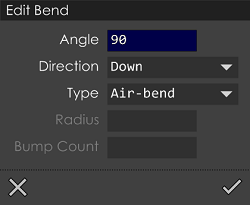
You can set the Bend Angle, Bend Direction, Type of bend (air-bend, coining, hemming etc) in this panel. In case of Large-Radius bends enter the Radius and Bump Count using the options provided. As the bend information is being edited for these bends, the dots on the bend lines will change to yellow (to indicate that the bend information has been edited). This way, one can quickly see which bends lines have been reviewed and modified.