RightAngle Reference Manual

  • Welcome to RightAngle Control
  • Introduction
    • User Interface
    • Gauging
    • Tools
    • General panels
    • Application notes
      • Selection of Tools
      • Air bending
      • Large Radius Bending
      • Hemming
      • Coining
  • Home
  • Create
    • From Profile
      • Profile Selection
      • Create/Edit a Profile
      • Extrude
    • Fold Flat DXF
      • Main Screen
      • Create
      • Edit
      • Fold
    • Import 3D model
      • Main screen
      • Unfold
      • Do Tooling
    • Direct Programming
      • Main Screen
      • Add/Remove
      • Settings
      • Run
      • Navigate Bend
      • Corrections
      • Jog
      • Table Programming
    • Setting page
    • Create Tool
  • Edit
    • Sequence
    • Back gauges
    • Tooling
    • Simulation
  • Run
    • Main Screen
    • Model Based WF
      • Setup Sheet
      • Run Program
    • Program Based WF
      • Info Screen
      • Run
    • Corrections
    • Edit Cycle
  • Settings
    • Jog Axes
    • Manual Program
    • Tool Inventory
    • Other Settings
  • Feature list
    • Angle Measurement System (Pre-release)
      • IRIS Plus (Pre-release)
  • Tandem Operation
    • Operation
    • Communication Error
  • Impressum
  • FAQs
    • Licensing
Run
/
Edit Cycle

Edit Cycle

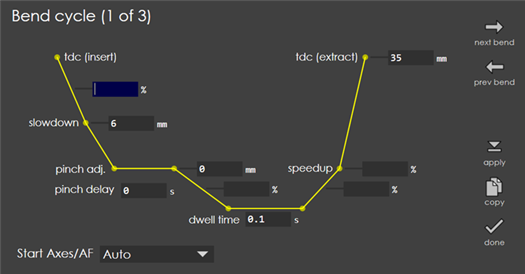
Touch the edit cycle button to bring up the bend cycle editor.
bendcycle

This editor displays a time-graph of the bending process. You can set up ram positions (like the slow-down positions), ram speeds (like the bend speed, approach speed) and delays (like the bend delay and the pinch delay) and then press apply to apply the changes. The changes made here are also saved with the program and used for the next time. Sometimes on a part, you may want a value to be copied across all the bends, say for example the TDC value. To facilitate this, use copy. Pressing this button copies the selected field’s value across all the bends of the part. A warning message (like Set Slowdown=6mm on all bends?) is displayed before applying the change.

Corrections Settings

      Copyright © 2025 TRUMPF Metamation. All rights reserved.

    Compiled by Bento