RightAngle Reference Manual

  • Welcome to RightAngle Control
  • Introduction
    • User Interface
    • Gauging
    • Tools
    • General panels
    • Application notes
      • Selection of Tools
      • Air bending
      • Large Radius Bending
      • Hemming
      • Coining
  • Home
  • Create
    • From Profile
      • Profile Selection
      • Create/Edit a Profile
      • Extrude
    • Fold Flat DXF
      • Main Screen
      • Create
      • Edit
      • Fold
    • Import 3D model
      • Main screen
      • Unfold
      • Do Tooling
    • Direct Programming
      • Main Screen
      • Add/Remove
      • Settings
      • Run
      • Navigate Bend
      • Corrections
      • Jog
      • Table Programming
    • Setting page
    • Create Tool
  • Edit
    • Sequence
    • Back gauges
    • Tooling
    • Simulation
  • Run
    • Main Screen
    • Model Based WF
      • Setup Sheet
      • Run Program
    • Program Based WF
      • Info Screen
      • Run
    • Corrections
    • Edit Cycle
  • Settings
    • Jog Axes
    • Manual Program
    • Tool Inventory
    • Other Settings
  • Feature list
    • Angle Measurement System (Pre-release)
      • IRIS Plus (Pre-release)
  • Tandem Operation
    • Operation
    • Communication Error
  • Impressum
  • FAQs
    • Licensing
Run
/
Program Based WF
/
Run

Run

Pressing the run button shown in this dialog takes you to the Run Program page. This page is similar to the page which comes up while running a model, the only difference being, in place of the 3D views of each step, a table with the step values are displayed. While running a direct program, the edit cycle and corrections buttons are highlighted whenever there is a change, and there is also a yellow dot displayed near each bend that has been corrected. See the image below - the current bend has some cycle corrections, and bends 1 and 3 have some corrections.
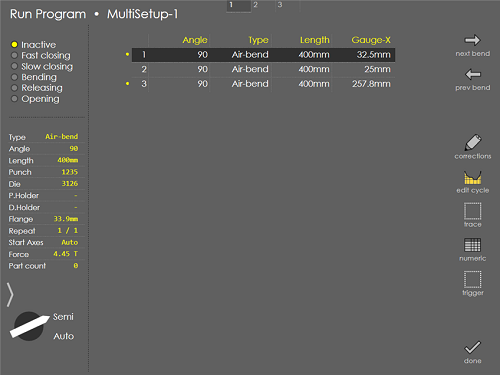
multisetup1

The actual bending cycle is similar - tap the pedal to position the gauges, press the pedal to bend.

Info Screen Corrections

      Copyright © 2025 TRUMPF Metamation. All rights reserved.

    Compiled by Bento