Right Angle Reference Manual

  • Welcome to RightAngle Control
  • Introduction
    • User Interface
    • Gauging
    • Tools
    • General panels
    • Application notes
      • Selection of tools
      • Air bendig
      • Large radius bendig
      • Hemming
      • Coining
    • Design of bend parts
      • Min radius and flange length
      • Corner design
      • Bending tolerances
  • Create
    • From Profile
      • Profileselection
      • Create / edit a Profile
      • Extrude
    • Fold Flat DXF
      • Main screen
      • create
      • Edit
      • Fold
    • Import 3D model
      • Main screen
      • Unfold
      • Do Tooling
    • Direct Programming
      • Main screen
      • Add / Remove
      • Settings
      • Run
      • Navigate bend
      • Corrections
      • Jog
      • Table Programming
    • Setting page
    • Create Tool
  • Edit
    • Edit Sequence
    • Back gauges
    • Tooling
    • Simulation
  • Run
    • Main screen
    • Model based WF
      • Setup Sheet
      • Run Program
    • Program based WF
      • Info screen
      • Run
    • Corrections
    • Edit Cycle
  • Settings
    • Jog Axes
    • Manual Program
    • Tool Inventory
    • Other Settings
      • Machine Settings
      • General Parameters
        • Machine
        • Tools
        • Safety
        • CAN ports
        • PLC Options
        • Digital input configuration
        • Maintenance
        • Log
        • Diagnostics
        • Display
        • Digital Protractor
        • Barcode
      • Y-Axis Parameters
        • General
        • Mute
        • Feedback
        • Pressure Valve
        • Pressure Sensor
        • Idle
        • Fast Closing
        • Fast Closing Advanced
        • Pressing
        • Pressure Advanced
        • Decompression
        • Opening
        • Y-Axis Cold Condition Parameters
        • Crowning
        • Electric Press Brake
      • Axis Parameters
        • X Axis
        • Hand Wheel
        • FL1
      • Defaults
        • Bend Cycle
        • Bend program
        • Import/Export
        • Others
  • Tandem Operation
    • Operation
    • Communication Error
  • Impressum
Settings
/
Other Settings
/
Axis Parameters

Axis Parameters

This chapter describes the parameters of the backgauge axis, handwheel and regrip axis (if used).

Parameters with the indication Icons2 behind the name are always visible, but they can only be edited when you have entered with administrator or service level password.

Parameters with the indication Icons3 behind the name are only accessible when service level password has been entered.

Backgauge Axis configuration

The RA smart controls are smart enough to configure the backgauge axis by themselves. With the help of machine ID, the backgauge axis configuration are derived from the machine file. In this way, the backgauge axis are perfectly positioned depending on the job, checked for collision, simulated accurately etc.,

The axis parameters and certain parameters relevant to particular axis are explained in further chapters:
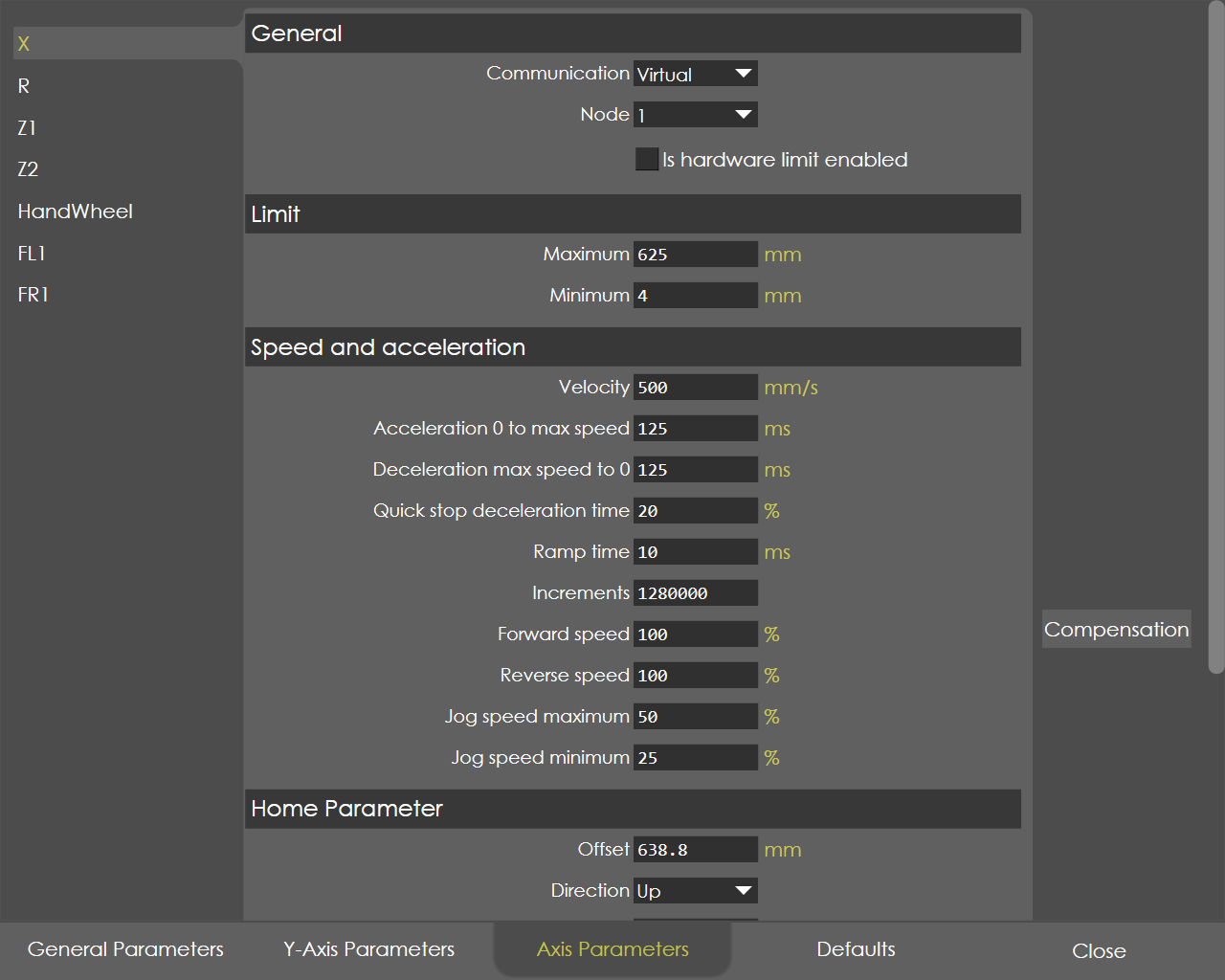
BackGaugeAxis

The followings settings are explained in this chapter:

  • X Axis

  • R Axis

  • Z1 Axis

  • Z2 Axis

  • HandWheel

  • FL1

  • FR1

Contents

  • Backgauge Axis configuration
Electric Press Brake X Axis

      Copyright © 2025 by TRUMPF SE + Co.KG. All rights reserved.

    Compiled by Bento