Right Angle Reference Manual

  • Welcome to RightAngle Control
  • Introduction
    • User Interface
    • Gauging
    • Tools
    • General panels
    • Application notes
      • Selection of tools
      • Air bendig
      • Large radius bendig
      • Hemming
      • Coining
    • Design of bend parts
      • Min radius and flange length
      • Corner design
      • Bending tolerances
  • Create
    • From Profile
      • Profileselection
      • Create / edit a Profile
      • Extrude
    • Fold Flat DXF
      • Main screen
      • create
      • Edit
      • Fold
    • Import 3D model
      • Main screen
      • Unfold
      • Do Tooling
    • Direct Programming
      • Main screen
      • Add / Remove
      • Settings
      • Run
      • Navigate bend
      • Corrections
      • Jog
      • Table Programming
    • Setting page
    • Create Tool
  • Edit
    • Edit Sequence
    • Back gauges
    • Tooling
    • Simulation
  • Run
    • Main screen
    • Model based WF
      • Setup Sheet
      • Run Program
    • Program based WF
      • Info screen
      • Run
    • Corrections
    • Edit Cycle
  • Settings
    • Jog Axes
    • Manual Program
    • Tool Inventory
    • Other Settings
      • Machine Settings
      • General Parameters
        • Machine
        • Tools
        • Safety
        • CAN ports
        • PLC Options
        • Digital input configuration
        • Maintenance
        • Log
        • Diagnostics
        • Display
        • Digital Protractor
        • Barcode
      • Y-Axis Parameters
        • General
        • Mute
        • Feedback
        • Pressure Valve
        • Pressure Sensor
        • Idle
        • Fast Closing
        • Fast Closing Advanced
        • Pressing
        • Pressure Advanced
        • Decompression
        • Opening
        • Y-Axis Cold Condition Parameters
        • Crowning
        • Electric Press Brake
      • Axis Parameters
        • X Axis
        • Hand Wheel
        • FL1
      • Defaults
        • Bend Cycle
        • Bend program
        • Import/Export
        • Others
  • Tandem Operation
    • Operation
    • Communication Error
  • Impressum
Settings
/
Other Settings
/
Machine Settings

Machine Settings

This document explains the different machine parameters used to control a press brake.

Changing User Levels

From Settings page navigate to Other settings → Machine settings → Change access.
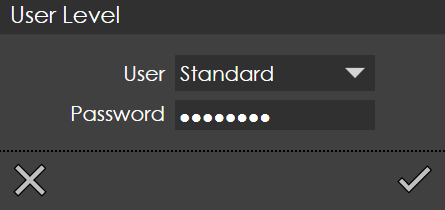
UserLevel

The most basic user level is Standard, which allows you to change the fundamental machine parameters. In this level, you cannot change the machine settings denoted by Icons2 or Icons3.

To change the machine parameters denoted by Icons2, you must be a administrator or service user.

Service level user access denoted by Icons3 enables for changes to all parameters. Normally, these parameters are set to the factory defaults and requires no change.

To change the user level access select the correct user level and enter the password.

Contents

  • Changing User Levels
Other Settings General Parameters

      Copyright © 2025 by TRUMPF SE + Co.KG. All rights reserved.

    Compiled by Bento