
Safety
Safety
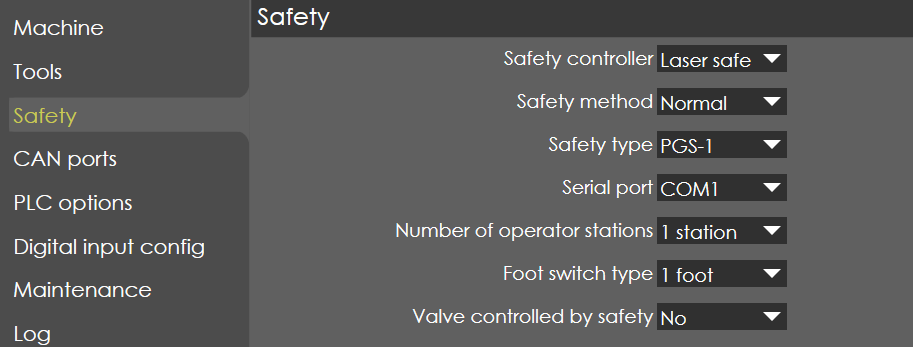
Safety controller
Range |
LaserSafe / Not used |
Default |
LaserSafe |
Units |
|
Access |
Service |
Function
This parameter defines the safety controller used in the machine.
Description
Currently only LaserSafe safety controllers are supported.
Safety method
Range |
Normal / No safe guard |
Default |
Normal |
Units |
|
Access |
Service |
Function
This parameter is used to specify whether bend guard is used or not.
Description
By default, normal is chosen which means bend guard is used. If “No safe guard” is chosen, then machine is considered without bend guard.
Safety type
Range |
PGS-1 / PCSS A0 / PCSS A1 |
Default |
PGS-1 |
Units |
|
Access |
Service |
Function
This parameter specifies the type of safety controller used.
Description
Currently only LaserSafe is supported. And safety types available for LaserSafe are as follows:
-
PGS-1
-
PCSS A0
-
PCSS A1
Serial port
Range |
COM1/COM2 |
Default |
COM1 |
Units |
|
Access |
Service |
Function
This parameter defines the COM number of serial port to which the safety external device is connected. Such a device can be a PLC, safety PLC or an angle measurement system. Right now, only one safety system is supported as follows:
-
LaserSafe PCSS
If a device is connected, the control and the device can exchange status information or press commands across the serial connection.
Description
NA
Number of operator stations
Range |
1 station / 2 station |
Default |
1 station |
Units |
|
Access |
Service |
Function
This parameter defines the number of stations used in the machine.
Description
If number of operator is set to 2, then inputs from both the station is required to operate the machine.
Foot switch type
Range |
1 foot / 2 hands / 1 foot and 2 hands |
Default |
1 foot |
Units |
|
Access |
Service |
Function
This parameter defines the type of operating switches used in the machine.
Description
Generally, the press brake machines are operated using 1 set of foot pedal for up and down motion respectively. In certain cases, hand switches are also used for operator convenient.
Valve controlled by safety
Range |
YES / NO |
Default |
NO |
Units |
|
Access |
Service |
Function
This parameter specifies how the hydraulic valves are controlled.
Description
If the valves are controlled by safety controller the parameter needs to be set as YES else NO.
Safety speed

Side door safety
Range |
YES / NO |
Default |
NO |
Units |
|
Access |
Service |
Function
Description
Side doors safety press brakes are often needed to allow for material loading, unloading, and maintenance access.
Limited backgauge speed
Range |
1-100 |
Default |
20 |
Units |
|
Access |
Service |