
Decompression
Speed and acceleration

Acceleration 0 to max speed
Range |
0-2000 |
Default |
200 |
Units |
ms |
Access |
Service |
Function
This parameter defines the acceleration time of Y-axis during decompression.
Description
This is the nominal acceleration of the axis, used to control the axis from zero to maximum speed in the decompression phase. This parameter must be programmed as the time in which the axis accelerates from zero to maximum speed.
Deceleration max speed to 0
Range |
0-2000 |
Default |
200 |
Units |
ms |
Access |
Service |
Function
This parameter defines the deceleration time of Y-axis during deceleration.
Description
This is the nominal deceleration of the axis, used to control the axis from maximum to zero speed when axis comes to its position in the deceleration phase. This parameter must be programmed as the time in which the axis decelerates from maximum to zero speed.
Gain
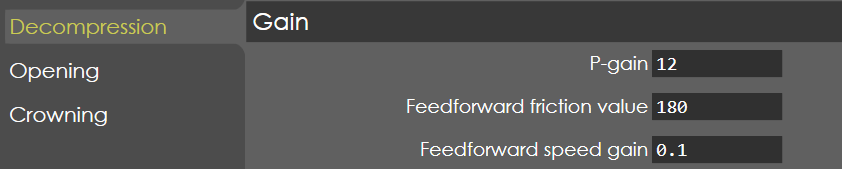
P-gain
Range |
0.1-999.99 |
Default |
12 |
Units |
NA |
Access |
Administrator |
Function
This parameter defines the Proportional gain factor of Y-axis during decompression phase.
Description
This gain factor defines the response to changes in the control signal. A high gain gives a quick response, if the gain is too high it will cause oscillation.
Feed forward friction value
Range |
0-999.9 |
Default |
180 |
Units |
NA |
Access |
Service |
Function
This parameter defines the gain factor for braking of Y-axis during decompression phase.
Description
To set gain factor for the axis when approaching the programmed position for a quick and smooth approach to target point.
Feed forward speed gain
Range |
0-999.9 |
Default |
0.1 |
Units |
NA |
Access |
Service |
Function
This parameter defines the gain factor for reducing the lag error of Y-axis during decompression phase. Thereby the beam follow the computed cycle more accurately.
Description
By increasing this gain, the beam will follow the computed cycle more accurately. It is recommended not to set this value too critically. A tracking error between 0.8 and 1.2 mm is a good practical value in decompression phase.
General
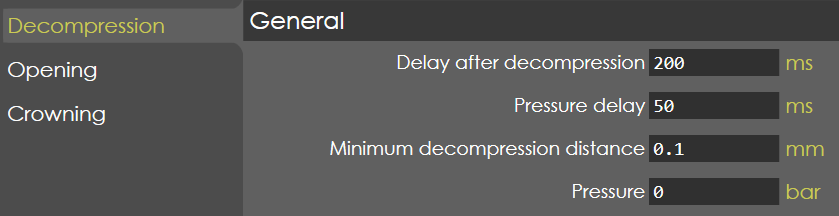
Delay after decompression
Range |
0-2000 |
Default |
200 |
Units |
ms |
Access |
Administrator |
Function
This parameter defines the delay time at the end of decompression phase.
Description
The delay after the decompression will avoid a jump at the start of the opening phase due to elasticity in the system. During this delay the pressure is set to zero and the proportional valves are opened in the opening direction. The "end of decompression" output (MS_DOP_EndofDecomp) becomes active after this delay has elapsed.
The value of this parameter can be determined as follows:
-
set this parameter to a larger value
-
record a stroke of the machine with the trace software When the decompression distance is reached, the pressure is set to 0 and the proportional valves are opened in the opening direction. In this situation the beam will move up a little. This movement will stop after a certain time. Measure the duration of this movement. This is the correct setting of this parameter.
Pressure delay
Range |
0-2000 |
Default |
50 |
Units |
ms |
Access |
Administrator |
Function
This parameter defines the delay before opening pressure is set.
Description
After decompression phase, the beam may show a slight 'hop' in the movement. This delay will avoid such movement of the beam.
Minimum decompression distance
Range |
0-9.9 |
Default |
0.1 |
Units |
ms |
Access |
Administrator |
Function
This parameter defines the minimum decompression distance the beam should move during decompression phase.
Description
If the programmed decompression distance is less than this parameter, then the beam is moved to this distance in the decompression phase.
Pressure
Range |
0-1000 |
Default |
0 |
Units |
Bar |
Access |